CSD (CygNet Swinging Door) Compression Thinning Model
The CSD Compression model thins data in a very similar manner as the Deadband Compression model. It starts with the first value in the period and begins iterating through successive values. When it finds a value that exceeds the linear definition, it saves the last value that met the definition, and continues the cycle. Where the deadband compression model looks for a value delta outside a deviation, this model looks for a linear slope. A series of values are determined to be linear if the line between the first and last value intersects the deviation range of all the values in the series. The deviation range is the value of the point +/- the specified deviation value.
See CygNet Swinging Door Compression for more information about this method of compression.
CSD Compression Thinning Model Properties
| Property | Description |
|---|---|
|
Save records with status bit changes |
If enabled, a new entry is saved if the status bits have changed even if the value doesn’t exceed the deviation. |
|
Delete unreliable records |
If enabled, deletes all records that are marked as unreliable. Note: Only Analog point types marked as unreliable will be deleted. Use the Unreliable thinning model to delete all point types marked as unreliable. |
| Period Definition | |
|
Starting at day |
Specifies the number of days between today and timestamp of an entry. Must be a value greater than 0; no thinning can occur on entries from the current day. ExampleA day value of 60 would correspond to all entries at least 60 days older than today. |
|
Deviation |
Value used to determine if consecutive values form a linear slope. The Thinning Simulator can be used to help determine an appropriate deviation value. |
|
Preview |
Click to preview CSD Compression for the selected point in the Compression Preview feature. See Previewing Data Compression in the History chapter for more information. Note: Compression Type and Deviation are the only parameters passed to the Compression Preview dialog box. Deviation is the only setting passed back to the CSD Compression page. |
|
Set Max Time |
If enabled, and the time elapsed between an entry and the last saved entry is greater than the specified max time, then the entry will be automatically saved even if it does not exceed the deviation. |
|
(seconds) |
Type the Max Time in seconds. |
To Create a CSD Compression Thinning Model
- On the Configure Thinning Models dialog box, click Create Model.
- Type a Model Name. This name should fully identify the model to ease selection of the appropriate model when creating rules.
- Select the CSD Compression page.
- If desired, enable Save records with status bit changes.
- If desired, enable Delete unreliable records.
- For each period range, type the Starting at day, Deviation, enable Set Max Time, and (seconds).
- Click Preview to preview the compression settings. See Previewing Data Compression.
- Click Add/Save to add the range to the list box.
- To make changes to an existing range, select the range from the list and click Edit.
- To delete a range highlight and click Delete.
- To delete all ranges click Clear All.
- Repeat steps 6 and 7 for each desired range.
- Click Save Model. To discard all changes click Cancel.
- To make changes to an existing model, select the model from the list and click Edit Model.
- To delete an entire model highlight the model name and click Delete Model. Models may only be deleted if no rules are currently set to use the model.
- Click OK to return to the Configure Thinning Rules dialog box.
To Edit an Existing CSD Compression Thinning Model
- On the Configure Thinning Rules dialog box, select an existing thinning rule, and click Edit Rule.
- On the Configure Thinning Rules dialog box, select an existing thinning rule, and click View/Edit Models.
- Select an existing CSD Compression thinning model, and click Edit Model.
- Edit the model as described in steps 4 -10 above.
CSD Compression Thinning Model Example
|
Sample CSD Compression Thinning Model |
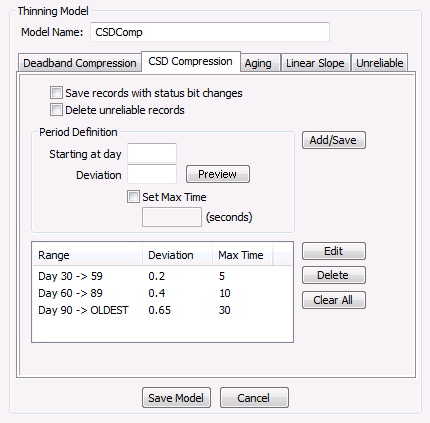
In the example above, history values newer than 30 days would not be subject to thinning. Values between 30 and 59 days old would be evaluated with a deviation of 0.2, all values between 60 and 89 days old would be evaluated with a deviation of 0.4, and all values older than 90 days would be evaluated with a deviation value of 0.65. The thinner would start with the oldest value and assuming it is older than 90 days, it will use a deviation of 0.65. The next value will obviously meet the linear requirements since there are only two values being evaluated. When the third value in the iteration is reached, the slope between it and the first value will be calculated and it must intersect the value of the second value plus or minus 0.65. Assuming this criteria is met, the fourth value is evaluated and a slope is calculated between it and the first value. This slope must intersect the value of both values two and three plus or minus a value of 0.65. This process continues until a value is evaluated where the slope between it and the first value does not intersect the deviation range of all the contained values. In this example, assume that the tenth value evaluated failed this criteria. In that case, values two through eight would be deleted and the ninth value would become the last saved value, and the process would start over.


